



A rich snippet is an enhanced search listing, such as one showing stars, a price, a date, or an image, generated from structured data on a page; the markup can make the page eligible for that display, but it doesn't raise the page's ranking. Google's documented examples include a 25% higher click-through rate for enhanced Rotten Tomatoes pages, but that result belongs to that site, not every site that adds schema.
That distinction is the heart of rich snippets SEO. The markup gives Google information it can use to present an eligible page differently, but Google decides whether to display the enhancement. Your job is to make the information accurate, technically accessible, and useful to searchers, then check whether the result earns attention.
Table of Contents
- What Rich Snippets Are and Why They Matter
- Rich Result Types and the Schema Each Needs
- How Structured Data Earns a Rich Result
- How to Add and Validate Structured Data
- Why Valid Markup Still Fails to Display
- What Rich Snippets Change in Clicks and Engagement
- Keep Rich Result Markup Accurate as Google Changes
- Audit Your Money Pages Before Adding More Schema
What Rich Snippets Are and Why They Matter
A rich snippet is an enhanced search result that may show details such as star ratings, prices, dates, authors, or images, drawn from structured data on the page. Google now generally calls these enhanced listings rich results, although many site owners and SEO guides still use “rich snippets.”
Think of a standard search listing as a business card with a name and a link. A richer listing is the same card with extra details, perhaps a product price, a review rating, or an event date. Those additions can help a searcher decide whether the page matches what they need before clicking, but they don't guarantee attention or a visit.
Common types include products, review snippets, recipes, events, videos, breadcrumbs, and FAQs. Each type fits different page content, and Google may display an enhancement only for eligible pages and queries. Even then, the listing still competes with every other result shown for that search.

Google introduced enhanced displays for pages about people and reviews in 2009. In June 2011, Google, Bing, and Yahoo launched Schema.org, a shared vocabulary that helps search engines interpret information about entities such as products, places, and events. Google's announcement of Schema.org also described how rich snippets had expanded beyond their original uses.
The principle hasn't changed: structured data can qualify a page for an enhanced presentation, but it doesn't directly improve rankings. A page still needs to be relevant and useful. Markup is a way to describe what's there, not a shortcut to a higher position.
Rich Result Types and the Schema Each Needs
The following list compares common result types, the schema associated with each, and the main status or eligibility detail to check before implementing it.
Product
- Schema type: Product
- What searchers see: Price, availability, star rating
- Key required properties: name, offers (price, priceCurrency)
- Status to check: Merchant listing rules apply
Review snippet
- Schema type: Review, AggregateRating
- What searchers see: Star rating with review count
- Key required properties: itemReviewed, ratingValue, author
- Status to check: Self-serving reviews of your own business aren't eligible
Recipe
- Schema type: Recipe
- What searchers see: Rating, cook time, calories, image
- Key required properties: name, image
- Status to check: Broadly supported
Event
- Schema type: Event
- What searchers see: Date, venue, ticket information
- Key required properties: name, startDate, location
- Status to check: Broadly supported
Article
- Schema type: Article
- What searchers see: Headline, image, publication date
- Key required properties: headline, image, datePublished
- Status to check: Eligible for article features
Video
- Schema type: VideoObject
- What searchers see: Thumbnail, duration, upload date
- Key required properties: name, description, thumbnailUrl, uploadDate
- Status to check: Video must be on the page itself
Breadcrumb
- Schema type: BreadcrumbList
- What searchers see: Path shown under the page URL
- Key required properties: itemListElement with position, name, item
- Status to check: Broadly supported
FAQ
- Schema type: FAQPage
- What searchers see: Expandable questions under the listing
- Key required properties: mainEntity with Question and acceptedAnswer
- Status to check: Restricted to well-known government and health sites
HowTo
- Schema type: HowTo
- What searchers see: Step list in the listing
- Key required properties: step
- Status to check: Removed from most results
Dataset
- Schema type: Dataset
- What searchers see: Dataset listing in specialized search
- Key required properties: name, description, url
- Status to check: Phase-out announced; see the maintenance section
Required properties are the fields Google needs to consider an item eligible. If a required field is missing, the item may fail eligibility checks. Recommended properties can provide useful detail, but they aren't the same as required fields.
Match the schema to the page's main subject. A product detail page can describe its product, but a category page listing several products shouldn't pretend that one product is the page's central entity. The same principle applies to review markup: don't mark up ratings that don't genuinely describe the subject of the page.
Breadcrumb markup can fit many sites because most pages have a place in the site's navigation path. But broad usefulness doesn't mean every type will produce a visible result. Google has limited FAQ rich results to well-known government and health sites, and HowTo results have been removed from most search results. Check the current structured data gallery before building, because supported result features can change.
A practical choice is one type per page that matches the main entity visitors can see. Don't add every schema type that a plugin offers. Choose the type that fits the page, then verify its current requirements and eligibility conditions.
How Structured Data Earns a Rich Result
Structured data works like a shipping label. A courier can read the label to understand what a parcel contains without opening the box. Similarly, markup describes a page's content in a format search engines can process, giving Google information it may use to generate an enhanced listing.

For a page to qualify, the markup has to pass three basic checks. It must describe content that visitors can see, include every required property for the selected result type, and follow Google's content and spam policies. Missing required fields can make an item ineligible; inaccurate or hidden information can also prevent the enhancement from appearing.
Google supports JSON-LD, Microdata, and RDFa. It recommends JSON-LD because the structured data can sit in a script block separate from the page's visible HTML, which usually makes it easier to implement and maintain. Whatever format you choose, the values must match what visitors see.
Consider an online shop. Product markup belongs on a product detail page where the product is the main subject. It doesn't belong on a general category page just because that page lists products. If the product markup omits a required property, that item may be ineligible even if the rest of the page is well optimized.
There's a difference between qualifying for a result and being shown in one. Google can choose not to display an enhancement even when the markup passes testing. The structured data policies explain the requirements, but schema still doesn't replace crawlability, useful content, or competitive relevance. For businesses building or improving their SEO foundations, Ansot's SEO services include technical work such as schema. Rendering and indexing problems can also interrupt eligibility, so a passing test isn't the last check.
How to Add and Validate Structured Data
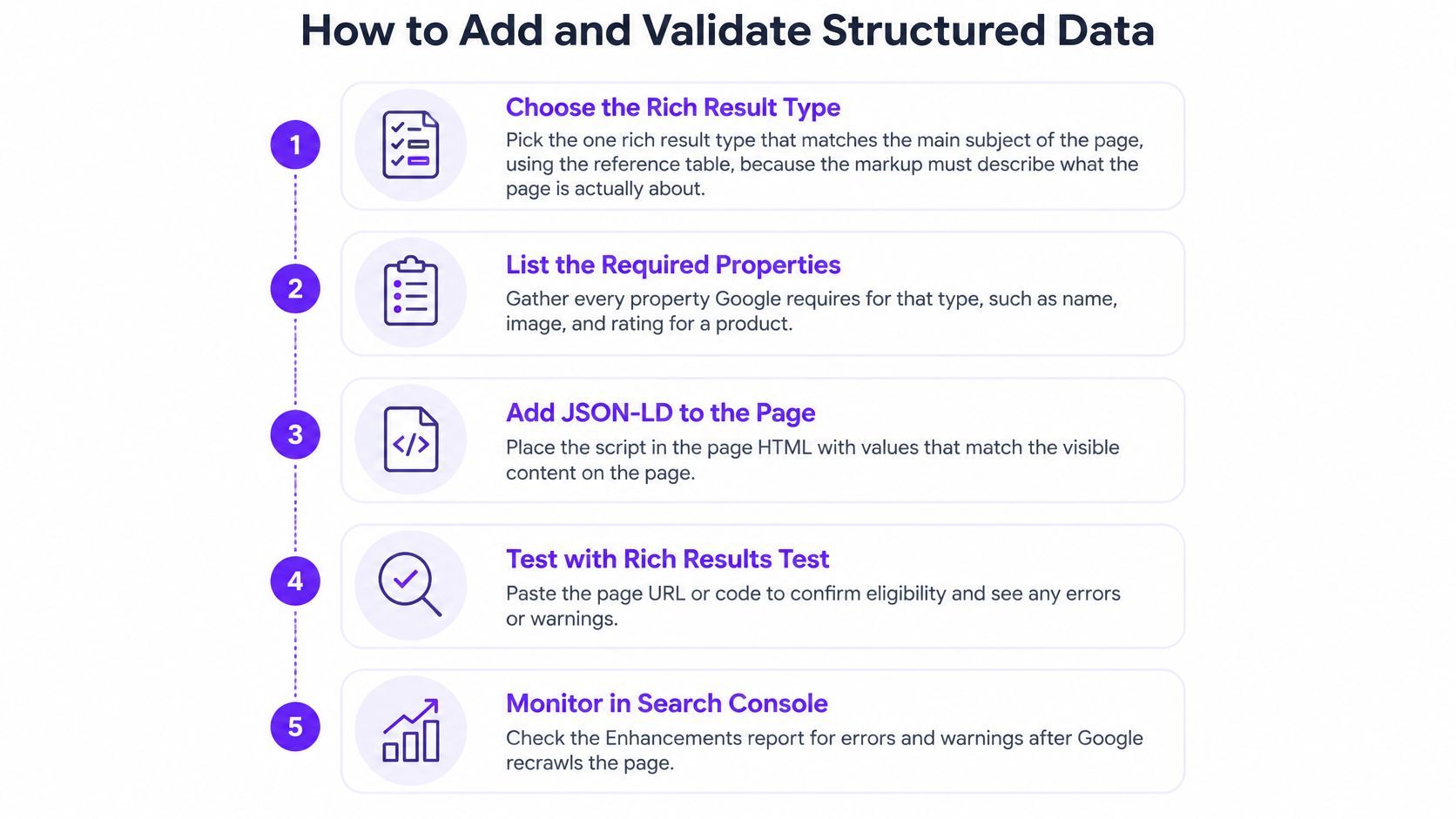
Use this implementation sequence to connect the markup to the page content and catch problems before they spread across a site template.
- Choose the rich result type. Pick the type that matches the page's main subject, using the comparison above as your reference. If the page is a product detail page, for example, Product markup may fit; the label should describe what the page is about.
- List the required properties. Find the required fields for the selected type in Google's documentation, then identify where each value appears on the page. A product's name, price, and availability should be visible to visitors if they're included in the markup.
- Write JSON-LD using page fields. Put the structured data in a script block and connect its values to the corresponding CMS fields. This makes it easier for the markup to update when a product, event, or other page detail changes.
- Apply it only to the right templates. Add Product markup to product pages where the product exists as the main subject, not indiscriminately to category pages. Template rules should reflect the content each page actually displays.
- Run the Rich Results Test. Test the live URL and fix errors that prevent eligibility. Review warnings too, because they may flag recommended properties that can make the markup more complete.
- Inspect the deployed URL. Use URL Inspection to check that Google can access and render the page and see the structured data. Testing source code alone doesn't confirm that the page works as Google encounters it.
- Monitor after releases. Review valid items, errors, and warnings in the Search Console rich-result reports after deployments and over time. Monitoring helps catch a template or content change before it leaves markup broken across many pages.
The CMS connection matters because markup can become inaccurate when visible content changes but the structured data doesn't. A price or event date that no longer matches the page can undermine eligibility even if the original implementation was correct. For a wider look at technical foundations, use this Webflow SEO checklist to review how page structure and search basics fit together.
Why Valid Markup Still Fails to Display
A validator can confirm that markup has a valid structure and includes required fields. It can't guarantee Google indexed the page, rendered the markup, or chose to show an enhancement. That's why a passing test and a plain search listing can both be true.
Validator passes but no rich result appears
- Likely cause: Marked-up values aren't visible on the page
- Fix: Show visitors the same values written in the markup
Test passes, search never shows the result
- Likely cause: Page is noindexed or blocked by robots.txt
- Fix: Check indexing status and directives in URL Inspection
Markup is in the source but missing in Google
- Likely cause: JavaScript injects it late, or the template strips it
- Fix: Compare rendered HTML with the source and move markup into the initial HTML
Search Console reports new errors after a release
- Likely cause: A template change removed a required property
- Fix: Revalidate every affected template after each deployment
Items fall out of the report over time
- Likely cause: Prices, dates, or ratings are stale
- Fix: Bind markup fields to the CMS so they update with the page
Page is eligible but never enhanced
- Likely cause: Google chooses not to show the enhancement
- Fix: Improve page quality and relevance, then monitor
What Rich Snippets Change in Clicks and Engagement
Google's published case studies show different outcomes across sites. These are examples of site-specific results, not forecasts or guarantees for another business.
Rotten Tomatoes
- Scale or coverage: Structured data on 100,000 unique pages
- Reported result: 25% higher click-through rate than pages without it
Food Network
- Scale or coverage: 80% of pages converted to support search features
- Reported result: 35% increase in visits
Nestlé
- Scale or coverage: Pages appearing as rich results
- Reported result: 82% higher click-through rate than pages without the enhancement
Rakuten
- Scale or coverage: Pages implementing structured data
- Reported result: Users spent 1.5 times longer on the pages
Rakuten AMP pages
- Scale or coverage: AMP pages with search features
- Reported result: 3.6 times higher interaction rate than AMP pages without them
The documented structured data case studies distinguish between how much of a site implemented structured data and what engagement change it reported. That distinction matters: a deployment milestone tells you about coverage, while a performance result describes an observed difference under that site's conditions.
To assess your own results, compare several months of Search Console data before and after implementation. Use pages with enough traffic to make the comparison meaningful, and account for seasonality so a normal change in demand doesn't get mistaken for a markup effect.
Then filter the performance report by search appearance, where the relevant data is available, to isolate enhanced listings. Track clicks alongside impressions and average position. A higher click-through rate can reflect a more appealing presentation, while a change in average position is a separate measure; don't treat the first as proof that the page gained rankings.
For businesses focused on turning search visits into enquiries or sales, structured-data measurement can sit alongside conversion work. Ansot's conversion optimization service focuses on improving the experience after a visitor reaches a page, which is a different part of the journey from earning an enhanced listing.
Keep Rich Result Markup Accurate as Google Changes
More schema isn't automatically better. A large markup footprint can create maintenance work without delivering useful search visibility, especially when it becomes stale or a feature is no longer supported.
Google has announced the phase-out of Practice Problem and Dataset structured-data experiences from Search, with related tooling and reporting changes beginning in January 2026. Its search updates also make clear that structured data can serve a specialized surface without necessarily producing a standard rich result. Technical validity alone doesn't establish commercial value.

Prioritize result types that fit your business and buyer journey, such as product, review, or event visibility where Google currently supports them. Service-related markup may also make sense where it accurately describes the page and is supported. Don't build schema just because a generator offers it.
A workable maintenance routine is straightforward:
- Inventory what's in use. Record each schema type, the templates that output it, and the pages it describes.
- Assign an owner. Make a person responsible for checking the markup and visible content on each template.
- Validate after releases. Re-test affected pages after template, CMS, JavaScript, or content changes.
- Review performance quarterly. Compare Search Console data for each result type and decide whether it still serves a useful purpose.
- Remove obsolete types. Take out markup that Google no longer supports or that no longer describes current page content.
A structured data block that passed a test before a redesign can break without warning afterward. Ansot's Webflow maintenance guidance covers the broader need to keep a site working as its content and implementation change. For schema, regular ownership and validation help prevent a technically correct one-time setup from turning into a stale one.
Audit Your Money Pages Before Adding More Schema
Before adding schema, confirm that the markup you already have is accurate. Start with the pages that matter most to your business, then fix mismatches before expanding coverage.
- List your priority pages. Choose the pages that generate the most revenue or enquiries, then note which rich result, if any, each could realistically qualify for.
- Compare markup with visible content. Check that every marked-up value appears on the page and is current. Correct any mismatch before adding another schema type.
- Validate and inspect. Run the testing and URL Inspection checks described earlier, and log each error against the affected page and template.
- Set a measurement window. Compare clicks and position before and after each change over three months, using the approach above to account for traffic and seasonality.
Ansot's monthly SEO service includes a technical SEO sprint covering speed, indexing, schema, and internal links, plus a live dashboard tracking rankings, traffic, and leads by page. We design sites, write copy, run SEO, and track enquiries back to the page that earned them. You can also arrange a focused review through Ansot's audit service.
The first decision isn't how many schema types you can add. It's whether the markup on your most important pages is accurate, visible, and worth maintaining.
If your rich-result markup needs a technical review, Ansot can assess schema alongside indexing, page structure, and the buyer journey. Visit us to discuss an audit or ongoing SEO support that connects search visibility with the pages and enquiries that matter to your business.