


Webflow website maintenance is the ongoing work of checking forms, content, links, custom code, performance and search visibility after a site launches. The goal is to catch problems in the journeys visitors use and keep the website useful as the business changes.
For a site hosted on Webflow, the platform manages hosting infrastructure and security patches. Your team still owns the site content, account access, third-party integrations and testing after changes. See the Webflow hosting overview for the platform’s responsibilities.
What does Webflow maintenance include?
A useful maintenance plan covers the live website and the systems connected to it: enquiry delivery, responsive layouts, accessibility, CMS accuracy, redirect behavior, analytics and third-party scripts. It should identify who checks each area, what counts as a fault and how a fix is verified.
A practical starting cadence
- After a release: test the changed pages on desktop and mobile, use the navigation with a keyboard, check links and confirm that forms reach the intended inbox or CRM.
- Weekly: review the main enquiry or purchase journey, broken links, integration failures and any new content. Use clearly labelled test data and remove it from lead reporting.
- Monthly: review Search Console pages and queries, important URLs, content accuracy, performance trends and the next set of improvements. Increase the cadence for busy sites or frequent releases.
- Before major changes: identify a recovery point, document what will change and check which connected systems need separate backups. Assign someone to verify the result after publishing.
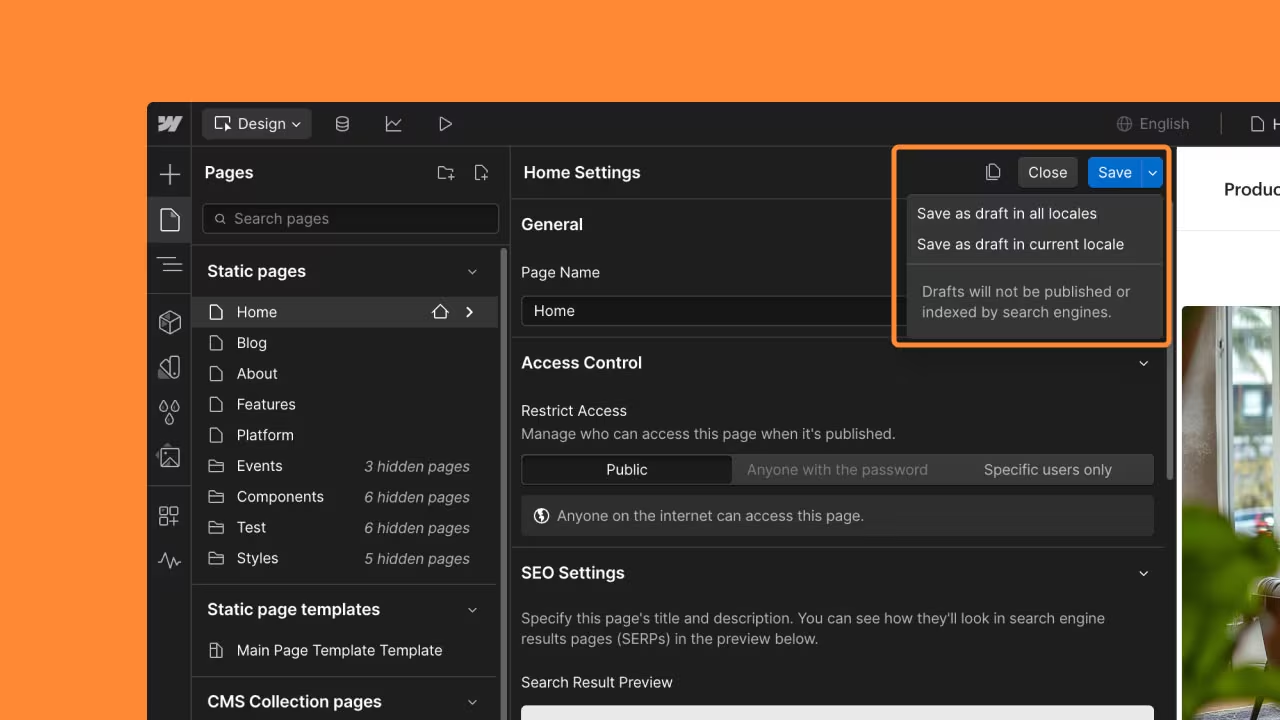
For Webflow-hosted forms, verify both the recorded submission and notification delivery. A success message alone does not prove that an email reached the right person. Webflow explains how to check form notification delivery.
Webflow provides saved site versions and restore controls. Review its backup and restoration guidance before making changes; a site restore can affect CMS publication information. Confirm the scope of recovery for external systems separately.
What should a maintenance report show?
Record the affected URL, the issue, the change made, the test performed and the next owner. Separate completed repairs from proposed experiments. Report enquiries and other business outcomes alongside search and performance trends; a higher test score alone does not demonstrate more revenue.
If you need recurring help with conversion improvements, monitoring and analytics review, explore the Website Maintenance & Support. Its service page explains the current scope; agree the capacity, response expectations and priorities before starting.
Key Takeaways
- Regular updates and security checks are crucial for optimal performance.
- Expert services streamline maintenance tasks, saving time and effort.
- SEO optimization improves search rankings and user engagement.
- Performance tracking ensures your platform runs efficiently.
- Professional support enhances digital credibility and user experience.
Why Website Maintenance is Crucial for Your Online Success
A secure and well-optimized site is the backbone of any successful online strategy. Regular checks and updates ensure your platform remains efficient, secure, and user-friendly.
By addressing potential issues proactively, you can avoid costly downtime and maintain a strong digital presence.
How Strong Security Measures Protect Your Website and Brand
Security is a critical aspect of keeping your site reliable. Hackers and malware are constant threats, making regular security audits and updates essential.
These measures protect sensitive data and prevent breaches that could harm your reputation.
For example, websites that undergo routine security checks are significantly less susceptible to cyber-attacks.
Implementing strict backup strategies also ensures operational integrity during unforeseen challenges like server malfunctions or security breaches.
Boost Your SEO and User Experience for Increased Engagement
Improving user experience goes hand in hand with boosting your SEO ranking. A responsive design, fast loading speeds, and error-free pages keep visitors engaged and encourage them to stay longer on your site.
Fix broken links and inaccurate information because they obstruct visitors and make the page less useful. Check indexing and search performance separately; changing content on a schedule does not guarantee a higher ranking.
By focusing on these elements, you create a seamless experience that drives traffic and builds trust.
For more insights on maintaining a robust online presence, explore this detailed guide.
Create an Effective Webflow Maintenance Plan for Long-Term Success
Crafting a clear roadmap is essential for long-term digital success. A well-thought-out strategy ensures your platform remains efficient, secure, and aligned with your business goals.
By defining objectives, scheduling updates, and budgeting for support, you can avoid costly emergencies and maintain optimal performance.

Set Clear Goals for Your Website Maintenance to Drive Results
Start by identifying what you want to achieve with your maintenance efforts.
Whether it’s improving performance, enhancing user experience, or boosting search rankings, having measurable goals keeps your team focused.
For example, setting a target for faster load times or reducing broken links can drive tangible results.
Keep Your Site Fresh: The Importance of a Consistent Update Schedule
Schedule content reviews, checks of third-party scripts and tests of the main visitor journeys. Webflow manages patches to its hosted platform; review the custom code and integrations your team has added separately.
Give each recurring task an owner and record what was checked. Use the results to choose the next improvement, rather than updating pages merely to make them look recent.
Smart Budgeting for Website Maintenance to Maximize Efficiency
Allocating resources for maintenance is crucial. Decide whether to build an in-house team or outsource to experts.
Outsourcing can save time and provide access to specialized skills, while an in-house team offers more control.
Whichever route you choose, ensure your budget covers regular audits, updates, and unexpected repairs.
- Align maintenance objectives with your marketing goals to boost overall performance.
- Collaborate with your team to assign clear roles and responsibilities.
- Use tools and systems to streamline tasks and improve efficiency.
Essential Components for a Successful Website Maintenance Strategy
Ensuring your platform operates at peak efficiency requires a structured approach. By focusing on performance, content updates, and security, you can create a seamless experience for users while safeguarding your digital assets.
Let’s explore the essential components of a robust maintenance strategy.
Proven Techniques to Optimize Your Website's Performance
Optimizing your site’s speed and responsiveness is crucial for retaining visitors. Techniques like compressing images, minimizing code, and leveraging caching can significantly improve load times.
A faster site not only enhances user experience but also boosts search engine rankings.
Regularly monitoring performance metrics helps identify bottlenecks and ensures your platform remains efficient.
Tools like Google PageSpeed Insights can provide actionable recommendations for further optimization.
Keep Your Content Relevant and Secure with Regular Updates and Backups
Keeping your content fresh and relevant is vital for engagement. Schedule regular updates to ensure information is accurate and aligned with current trends.
Additionally, implement a consistent data backup process to protect against data loss.
For example, automated backups can save time and ensure your site remains operational during unexpected issues. This proactive approach minimizes downtime and maintains user trust.
Conduct Regular Audits for Stronger Security and Performance
Review broken links, third-party scripts, form integrations and access permissions. Investigate new errors and remove integrations that are no longer needed after checking their dependencies.
Regular security scans are equally important to protect against cyber threats.
By staying proactive, you can reduce the risk of breaches and ensure your platform remains secure.
Expert Strategies to Streamline Your Website Maintenance Tasks
Streamlining tasks is essential for maintaining a high-performing platform. By leveraging modern tools and strategies, you can reduce manual effort and improve efficiency.
This approach ensures your site remains reliable, secure, and optimized for both user experience and search engine visibility.

Utilizing Automation and Monitoring Tools
Automate repeatable checks when the connected services support them. Document each workflow’s trigger, destination and failure alert, and test it after changes to forms, fields or credentials.
Use analytics to understand visitor behavior and dedicated uptime monitoring to detect availability problems. Define the event or failure you are measuring before choosing a tool.
Automation still needs verification. Compare results against a known test case and keep a way to investigate failed or duplicated submissions.
Integrating SEO and Analytics for Better Results
Merging SEO analytics into your maintenance routine enhances search engine rankings and user engagement.
Tools like Google Search Console provide actionable insights, such as fixing broken links or optimizing meta tags.
Regularly reviewing this data ensures your content stays relevant and your platform remains competitive.
Compare the same measurement before and after a change, with the period and any tracking changes recorded. Small samples, seasonality and simultaneous changes can limit what the result tells you.
By adopting these expert tips, you can streamline workflows, enhance user experience, and achieve long-term success.
Whether you’re managing updates or optimizing for search, the right tools and strategies make all the difference.
How to Choose the Right Maintenance Services for Your Website Needs
Choosing the right maintenance service can make all the difference. Whether you’re managing a small project or a large-scale platform, a structured approach ensures your site remains efficient, secure, and optimized for user experience.
Let’s explore how to implement these services effectively.
In-House vs. Outsourced Maintenance: Finding What Works Best for You
Deciding between an in-house team and outsourced support depends on your project’s needs and budget. In-house teams offer more control and immediate access, but they require significant resources for hiring and training.
Outsourced services, on the other hand, provide specialized expertise and flexibility, often at a lower cost.
For example, many businesses prefer outsourcing for tasks like security audits and performance optimization.
This approach allows them to focus on core operations while experts handle technical updates and content management.
Best Practices for Developers to Ensure Optimal Webflow Maintenance
Developers play a pivotal role in ensuring a platform remains efficient and secure. Their expertise in custom code and system monitoring is essential for maintaining optimal performance and enhancing user experience.
By focusing on these areas, they can create a seamless digital environment that meets both user and business needs.

Leveraging Custom Code and Design Adjustments
Custom code allows developers to tailor a site to specific requirements. Whether it’s enhancing design elements or adding unique features, custom solutions ensure the platform stands out.
For example, integrating advanced animations or optimizing navigation can significantly improve user engagement.
Regularly reviewing and updating code is equally important. Outdated scripts can slow down performance or create security vulnerabilities.
By staying proactive, developers can address potential issues before they impact the user experience.
Continuous Monitoring for Performance and Security
PageSpeed Insights combines controlled lab tests with historical field data when enough real-user data is available. Use each for its appropriate purpose, rather than treating one test as a live measure of every visitor’s experience.
Google documents the distinction between PageSpeed Insights lab and field data. Read the report in that context before prioritising work.
Regular audits also ensure the platform remains secure and efficient.
Security is another critical area. Developers should implement routine security scans and updates to protect against cyber threats.
For instance, enabling two-factor authentication and enforcing strong password policies can significantly reduce risks.
By adopting these best practices, developers can transform poorly built projects into maintainable platforms. For more insights, explore this guide on Webflow maintenance service.
Unlock Your Website's Potential with Our Expert Maintenance Services
In today's fast-paced digital landscape, maintaining a robust online presence is essential for success. At Ansot, we offer comprehensive website maintenance services tailored to meet your unique needs.
Our skilled team understands the intricacies of Webflow and is dedicated to providing top-notch maintenance that keeps your site secure, optimized, and user-friendly.
Join a Community of Webflow Experts
When you partner with us, you gain access to a guild of world-class Webflow developers who are passionate about enhancing your website’s performance.
Our team excels in various areas, from SEO optimization and security audits to content updates and performance tracking. With our expertise, we ensure that your website not only meets industry standards but also surpasses them.
Tailored Maintenance Solutions for Your Business
We recognize that every business is unique, which is why we offer customized maintenance solutions designed to address your specific challenges.
Whether you're a startup looking to build credibility or a growing business aiming to optimize your online presence, our services empower you to focus on what you do best: running your business.
Schedule a Consultation with Us Today!
Schedule a consultation with Ansot today! Let us show you how our expert maintenance services can enhance your digital presence and drive engagement.
Together, we'll unlock the full potential of your website, ensuring it remains a valuable asset in your business strategy.